Pixel art / GUIDE
Easy Pixel Art: Simple Ideas With Step-by-Step Grids
Draw eight original designs on a 12×12 grid. Follow the outline, add color, then finish the details with numbered examples and printable practice sheets.
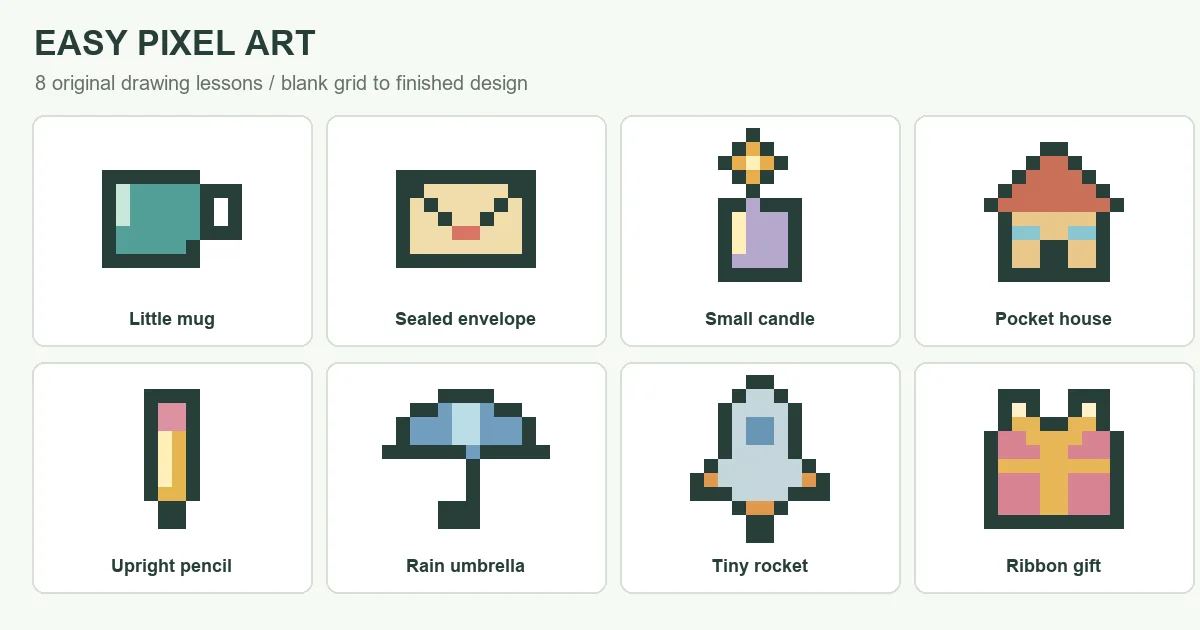
Start with a mug, an envelope or a tiny rocket: these eight easy pixel art lessons for beginners show exactly which squares to draw. Each example moves from an empty grid to an outline, main colors and a finished design. You can follow along on squared paper or in a drawing app.
Easy Pixel Art Ideas on a Small Grid
Each easy pixel art grid has 12 columns and 12 rows. The designs use three or four colors, including the dark outline. Empty squares are background, not an extra palette color.
For a first attempt at simple pixel art, choose the pencil for straight edges or the mug to practice leaving a hole. To keep these pixel art ideas easy to follow, the examples use flat colors and a few final details.
| Design | Grid | Colors | What you will practice |
|---|---|---|---|
| Little mug | 12 × 12 | 3 | Leaving a handle opening |
| Sealed envelope | 12 × 12 | 3 | Two matching diagonals |
| Small candle | 12 × 12 | 4 | A narrow flame above a block |
| Pocket house | 12 × 12 | 4 | A stepped roof and square windows |
| Upright pencil | 12 × 12 | 4 | Parallel edges and a short tip |
| Rain umbrella | 12 × 12 | 3 | A wide canopy and hooked handle |
| Tiny rocket | 12 × 12 | 4 | Mirrored fins and a small window |
| Ribbon gift | 12 × 12 | 4 | A ribbon crossing a rectangle |
Draw Each Design Step by Step
Make a blank 12×12 grid before each drawing. Count columns from left to right and rows from top to bottom, starting at 1. For example, column 3, row 5 means the third square across on the fifth row down.
Read each four-panel image in order: top left, top right, bottom left, bottom right. Copy the ink outline first, fill the main colors, then add the detail color. A square marked as empty in the finished picture should stay empty in your drawing.
On paper, color whole squares. In a digital editor, use a one-pixel pencil at full opacity for these lessons; the Aseprite painting-tool documentation, for example, explains brush size and opacity. Place cells individually rather than relying on a fill tool to handle diagonal outline gaps.
1. Little mug
12 × 12 pixels · 3 colors. K = ink (#263E39); A = teal (#539F97); C = mint (#C8E8D9).
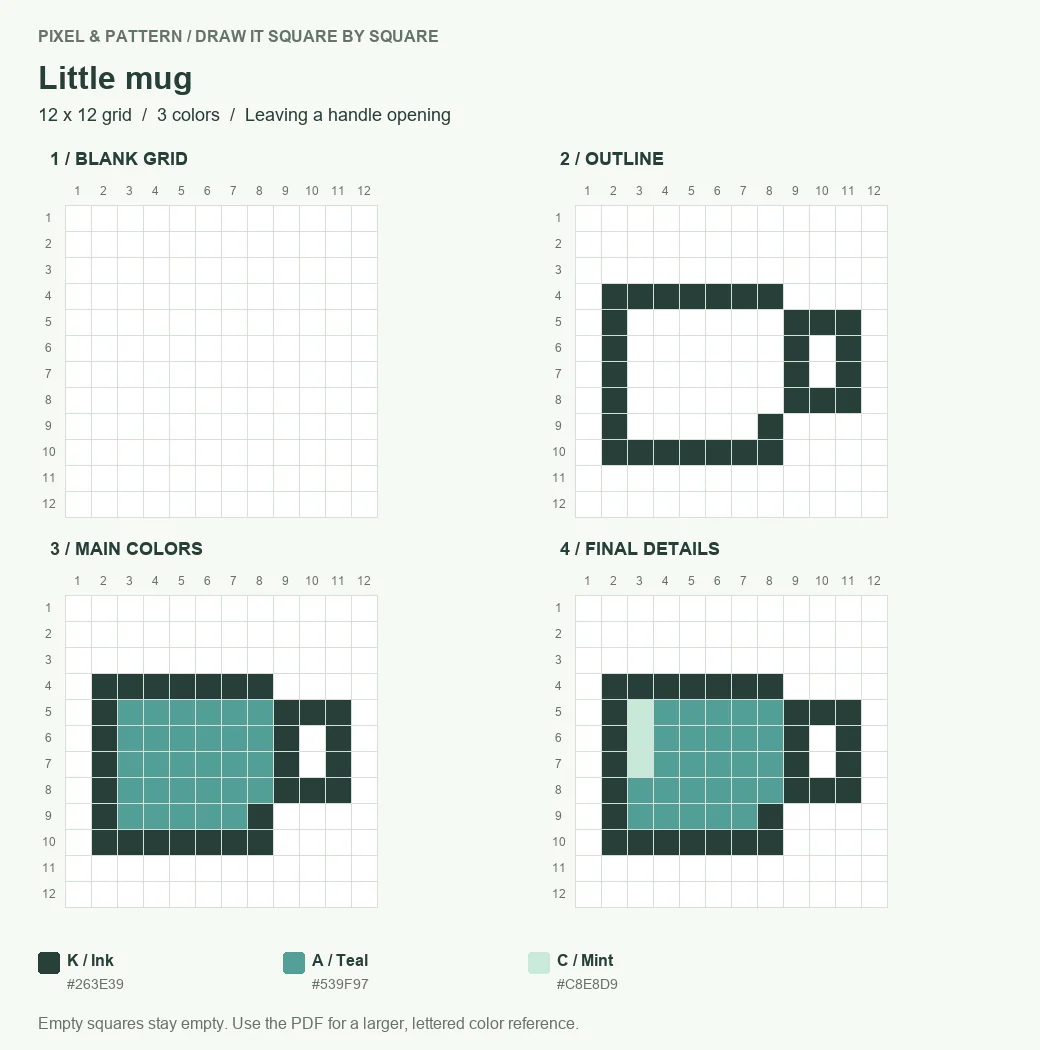
- Outline the cup from columns 2 to 8, starting on row 4. Copy the handle on the right, keeping its two empty cells in column 10, rows 6 and 7.
- Fill the cup with teal. Leave the handle opening and the area outside the outline unpainted; those spaces make the handle readable.
- Replace the three teal cells in column 3, rows 5 to 7, with mint. This short strip is the only finishing detail.
2. Sealed envelope
12 × 12 pixels · 3 colors. K = ink (#263E39); A = cream (#F1DDAA); C = coral (#D97667).
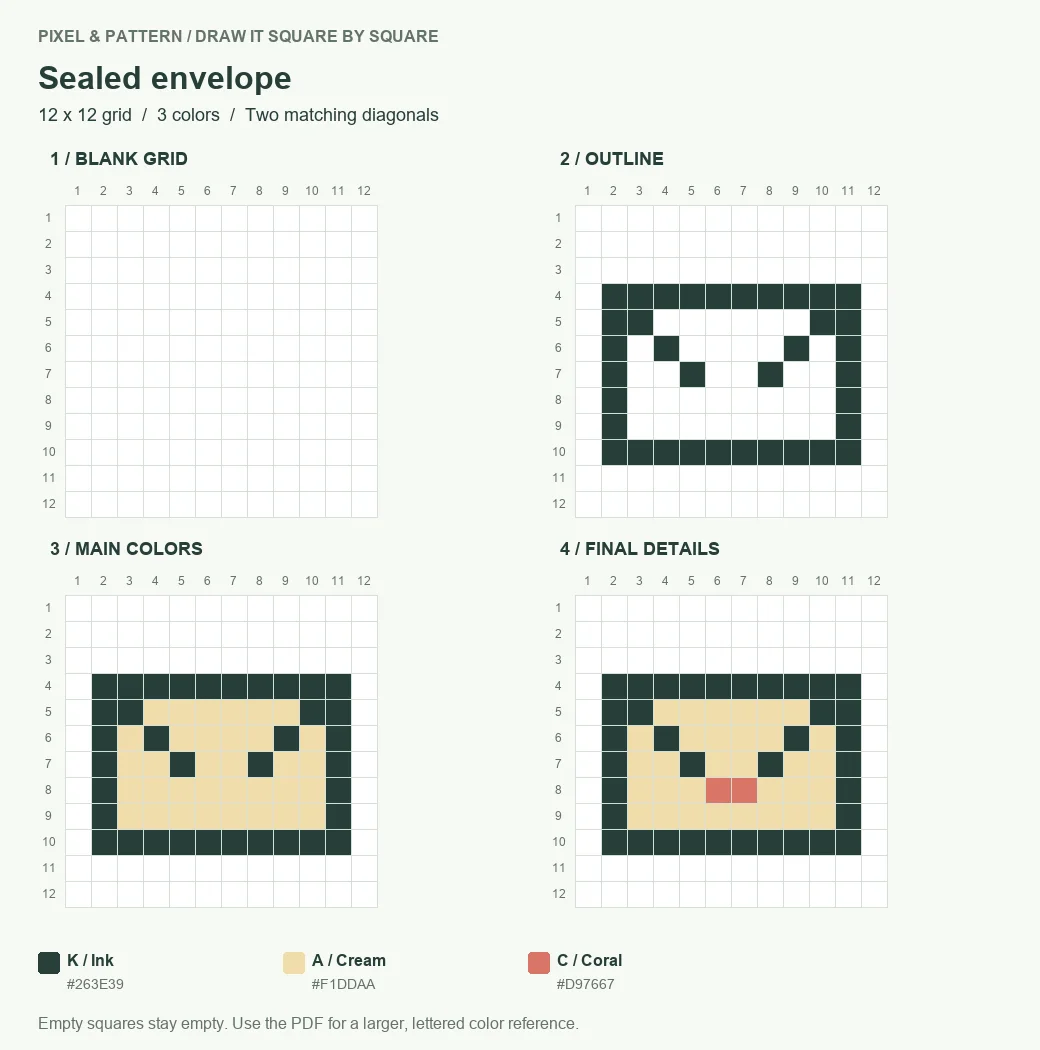
- Draw the rectangular border from columns 2 to 11 and rows 4 to 10. Add the two diagonal ink lines that descend toward the middle, as shown in stage 2.
- Fill the space inside with cream. Work around the ink lines instead of painting over them.
- Place two coral pixels in row 8, columns 6 and 7, to make the seal. Check that the diagonal on each side stops next to it.
3. Small candle
12 × 12 pixels · 4 colors. K = ink (#263E39); A = lavender (#B4A8CD); B = gold (#E8AE4D); C = pale yellow (#FFF0B9).
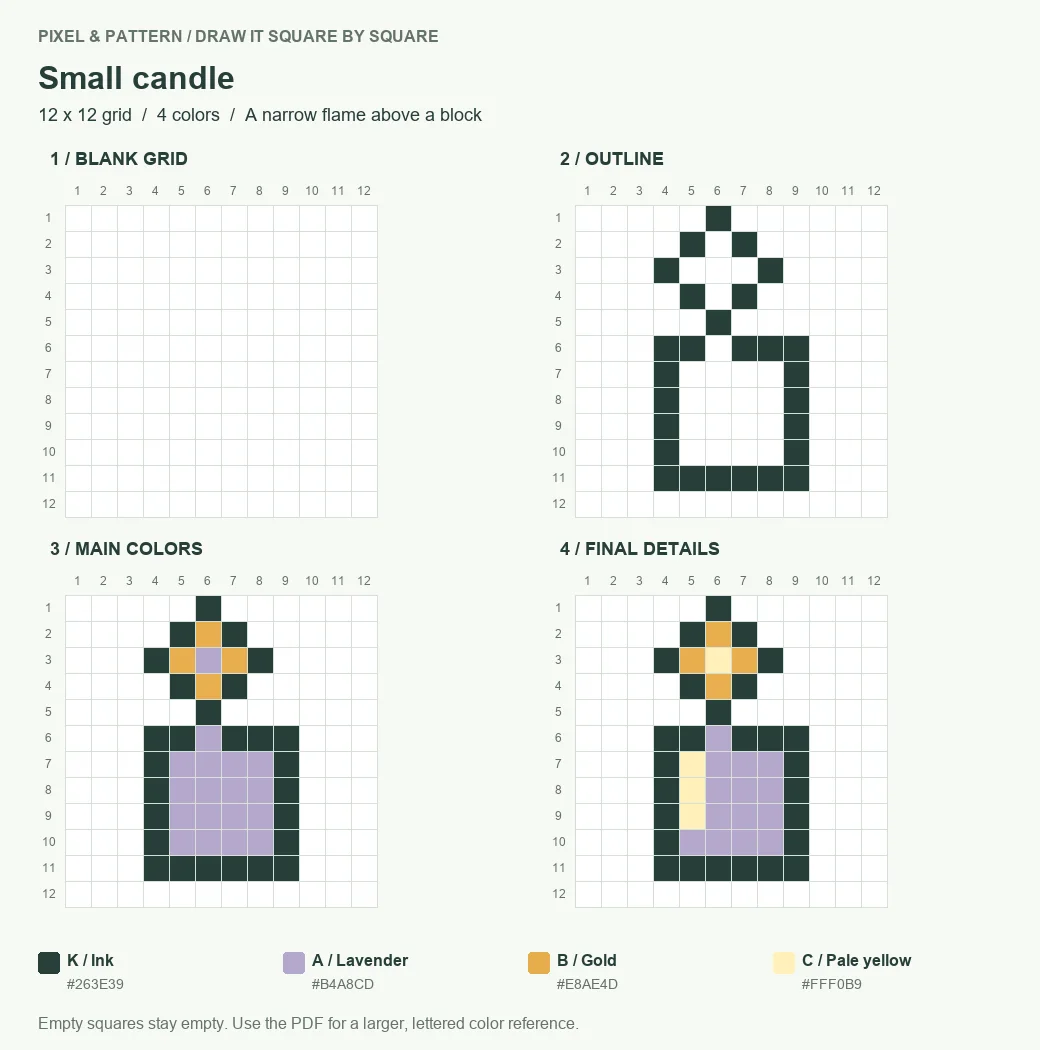
- Start with the candle body at columns 4 to 9, rows 6 to 11. Copy the flame above it, using the top pixel in column 6, row 1, as your alignment point.
- Fill the candle with lavender and the inside of the flame with gold. Keep the narrow ink connection between the two shapes.
- Use pale yellow at column 6, row 3, inside the flame, then at column 5, rows 7 to 9, on the candle. These are four finishing pixels in total.
4. Pocket house
12 × 12 pixels · 4 colors. K = ink (#263E39); A = sand (#E9C88B); B = terracotta (#C97057); C = sky (#8AC6CF).
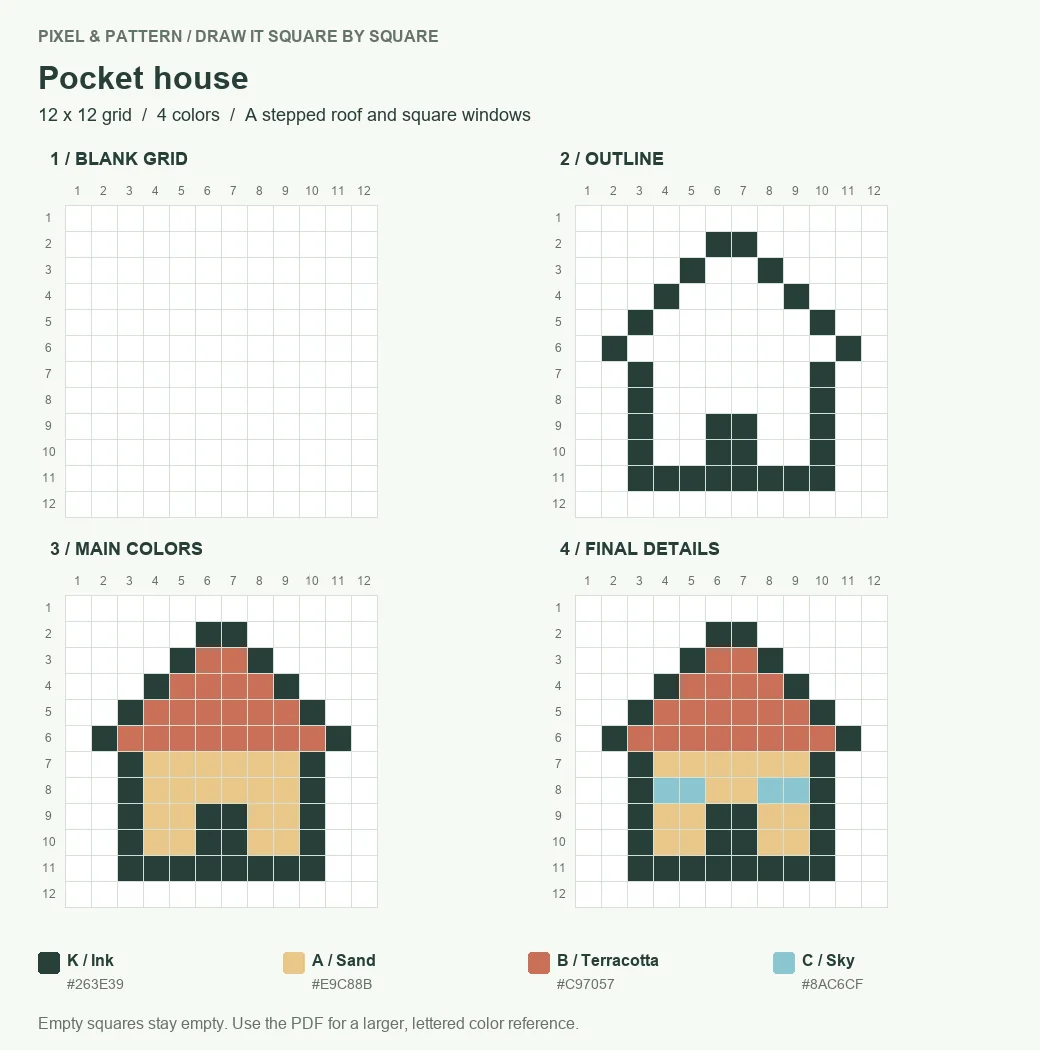
- Begin the roof with two ink pixels in row 2, columns 6 and 7. Step outward on both sides, then copy the walls and central doorway from the outline panel.
- Fill the roof with terracotta and the walls with sand. The doorway stays ink; do not fill it with the wall color.
- Add sky-blue windows on row 8: columns 4 and 5 on the left, 8 and 9 on the right. Their equal height keeps the front of the house balanced.
5. Upright pencil
12 × 12 pixels · 4 colors. K = ink (#263E39); A = yellow (#E4B64E); B = pink (#DD91A1); C = cream (#FFF0BA).
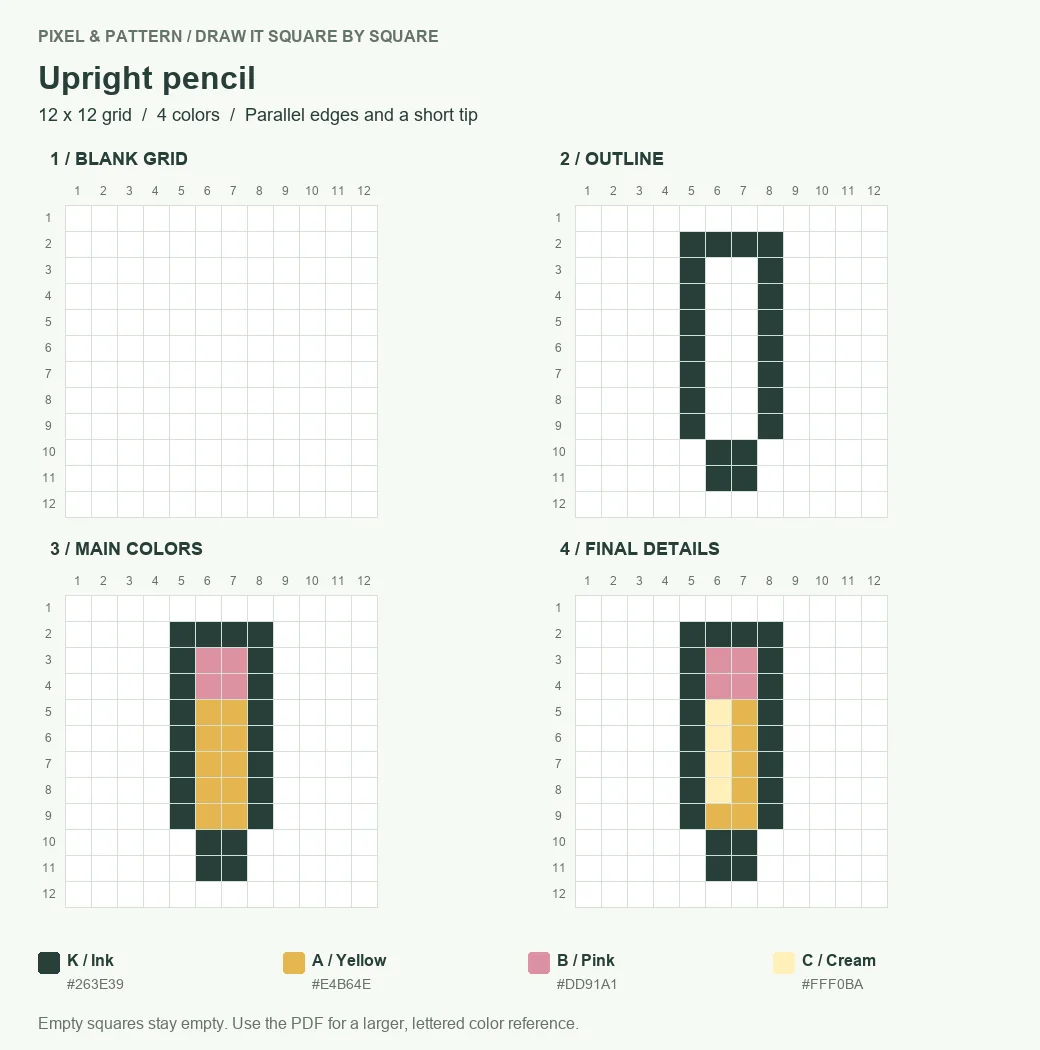
- Copy the long outline between columns 5 and 8, from rows 2 to 9. Narrow the bottom to columns 6 and 7 for the short tip.
- Use pink for the eraser inside the top and yellow for the shaft below it. Keep both outside edges straight.
- Add a cream stripe in column 6, rows 5 to 8. Stop before the tip so the stripe does not run through the outline.
6. Rain umbrella
12 × 12 pixels · 3 colors. K = ink (#263E39); A = blue (#719DBF); C = pale blue (#BADDE6).
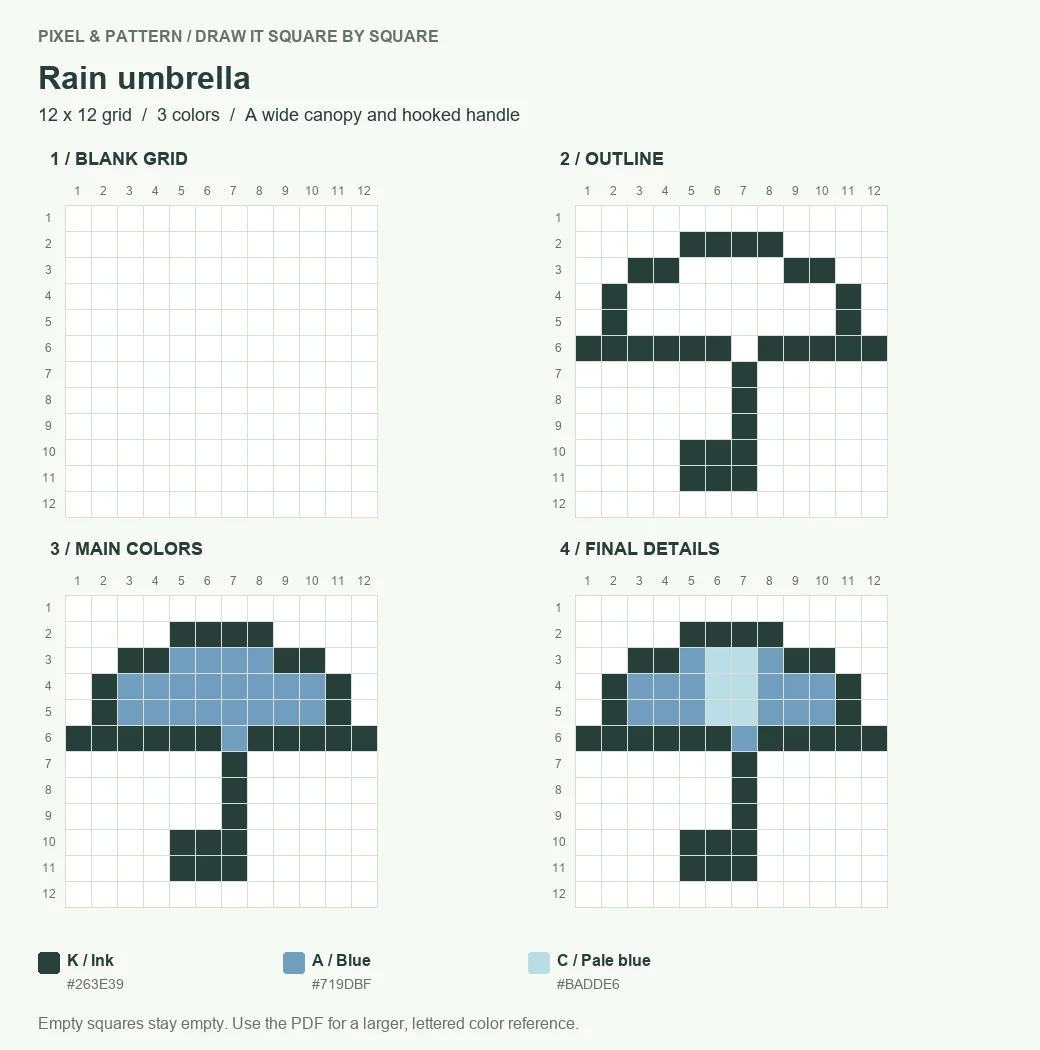
- Build the stepped canopy from its four-pixel top on row 2 to its full-width base on row 6. Copy the thin handle below it, including its left turn at the bottom.
- Fill the canopy with blue. The handle remains ink, with empty space on either side.
- Add pale blue in columns 6 and 7, rows 3 to 5. This center panel stops above the ink base; it does not continue down the handle.
7. Tiny rocket
12 × 12 pixels · 4 colors. K = ink (#263E39); A = silver blue (#C4D6DC); B = orange (#E0984C); C = blue (#6995B4).
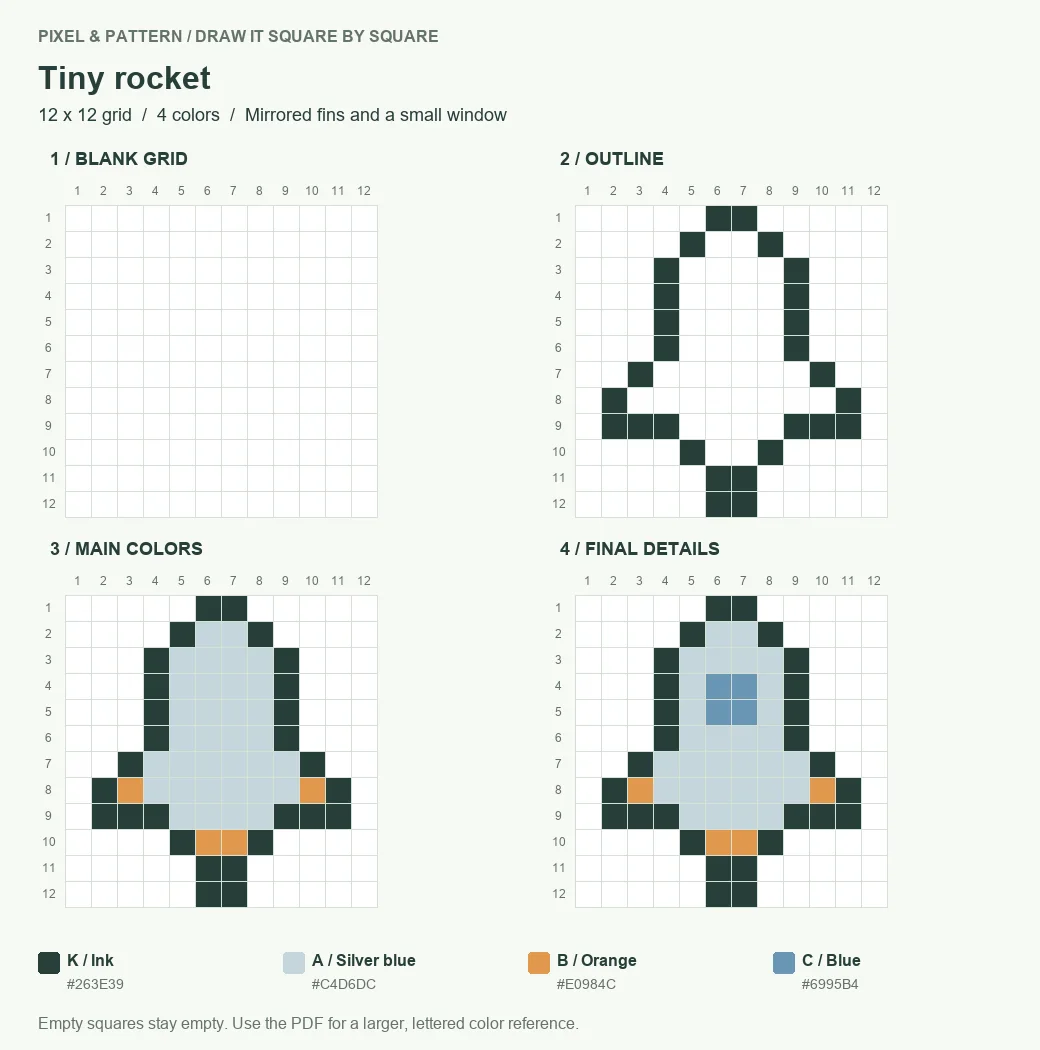
- Start at the two-pixel nose in row 1, columns 6 and 7. Widen the body, then copy the fins on both sides. Compare left and right at the same row.
- Fill the body with silver blue. Add orange inside the fins and at the exhaust on row 10, following stage 3.
- Make a blue 2×2 window at columns 6 and 7, rows 4 and 5. Check that its four pixels form a square, not a cross.
8. Ribbon gift
12 × 12 pixels · 4 colors. K = ink (#263E39); A = rose (#D88391); B = gold (#E8B757); C = cream (#FFF0C8).
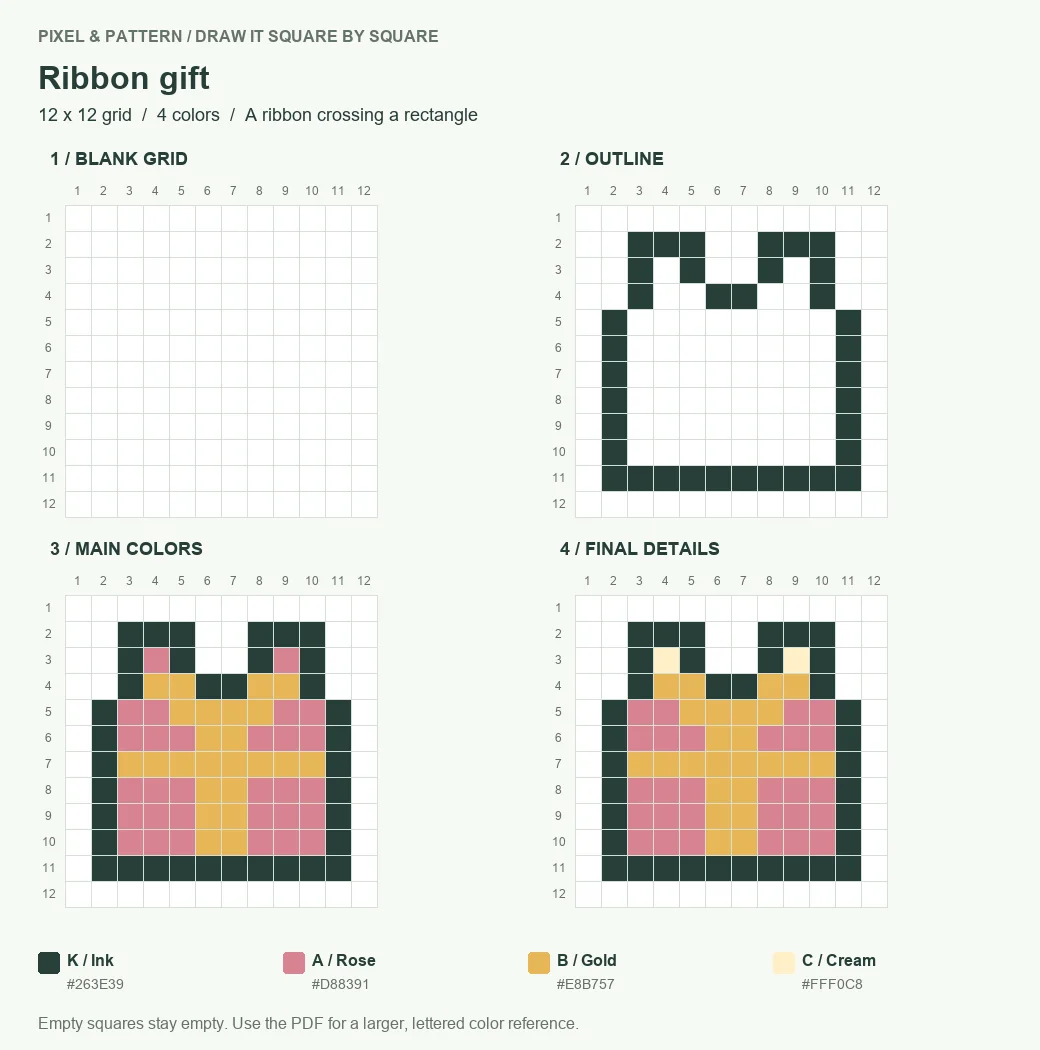
- Outline the box from columns 2 to 11 and rows 5 to 11. Add the two bow loops above it; their inner cells will receive the final detail color.
- Fill the box with rose. Add the gold vertical ribbon in columns 6 and 7 and the horizontal ribbon across row 7, as shown in stage 3.
- Put cream in the two loop centers: column 4, row 3, and column 9, row 3. Leave the empty gap between the loops untouched.
If your drawing looks different: check the outline against stage 2 before adding more detail. A closed mug handle, an extra window pixel or a filled umbrella gap changes the shape even when the palette matches. Count from the grid edge again at the first row that looks wrong.
Download the Practice Grids
Download the easy pixel art practice book (PDF). The 10-page file contains all eight four-stage lessons, followed by two practice sheets with four blank grids each. The final reference grids include palette letters so you can distinguish colors that look similar on screen or in print.
Print the lesson you want and its practice sheet on US Letter or A4 using Fit to page. The printed squares are drawing guides, not a fixed physical size. If you print in grayscale, use the letters and color names in the key when choosing your pencils.
After copying a design, try it again on a blank grid and change one main color. Keep the outline and empty spaces the same so you can see what your color choice changes. That gives you a second exercise without needing a more complicated drawing.
These lessons are for drawing by hand. If your next project starts with an existing picture, use the image to pixel art converter to convert that image. It is a separate workflow, not a drawing editor for these step-by-step grids.