Pixel art / GUIDE
Flower Pixel Art: Original Designs With Printable Grids
Draw a cupped tulip, a hanging bell and an open fan of petals. Each design comes with visible drawing stages, a transparent PNG and a matching practice sheet.
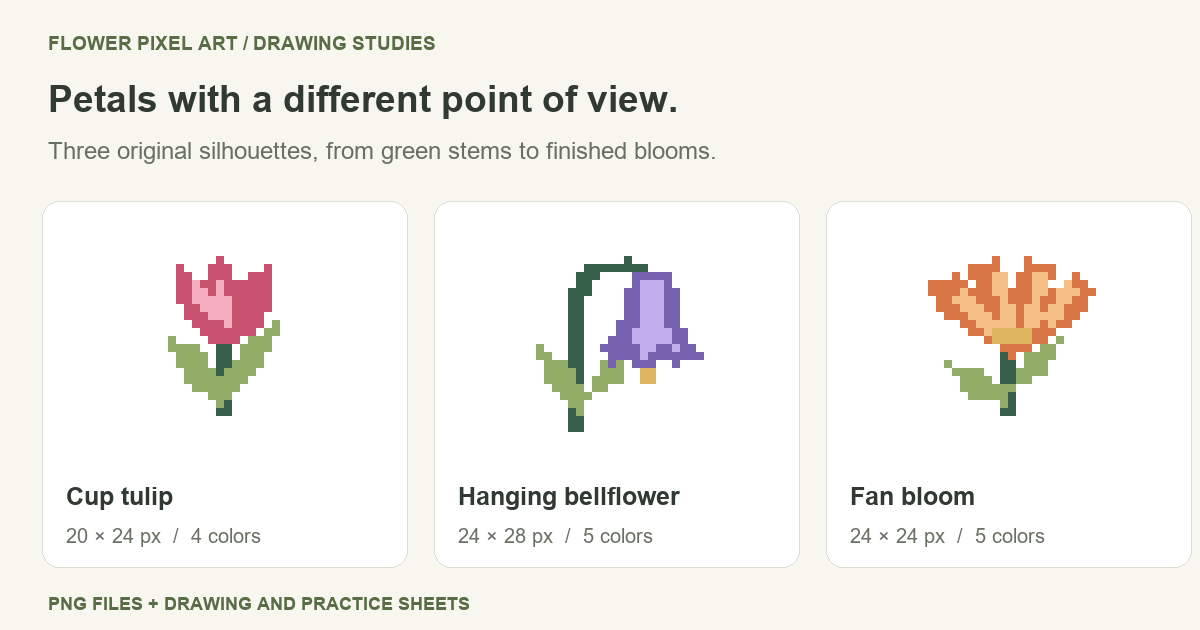
A gap between two petals can do more for a tiny flower than another color. In these flower pixel art drawings, those gaps create three distinct shapes: a cup opening upward, a bell hanging to one side, and a broad fan. The examples below show how to preserve each outline while adding stems, leaves and small color accents.
Use the finished pictures as icons or work through the drawing stages. The PNG files and printable practice sheets are supplied together with permission to use the flower artwork in your own projects.
Flower Pixel Art Designs
| Design | Canvas | Colors | Shape to notice |
|---|---|---|---|
| Cup tulip | 20 × 24 | 4 | Three raised petal tips |
| Hanging bellflower | 24 × 28 | 5 | A downward-facing opening |
| Fan bloom | 24 × 24 | 5 | Petals spreading outward |
The dimensions describe the complete PNG canvas, measured in pixels. Transparent border space is included in that measurement but excluded from the color count. These are stylized drawings: the fan bloom is an invented form, and the collection is not intended as botanical identification.
Build Petals and Leaves on a Grid
Each illustration has three checkpoints across the top. The first places the green support shapes; the second establishes the head of the flower; the third adds the remaining colors. Underneath, the lettered grid records the final pixel positions. Open an illustration at full size when you need to inspect a particular row.
The first column is at the left and the first row at the top. Fill a cell only when it contains a letter. A blank cell inside a notch is just as intentional as the blank margin around the plant.
An easy pixel art flower: the cup tulip
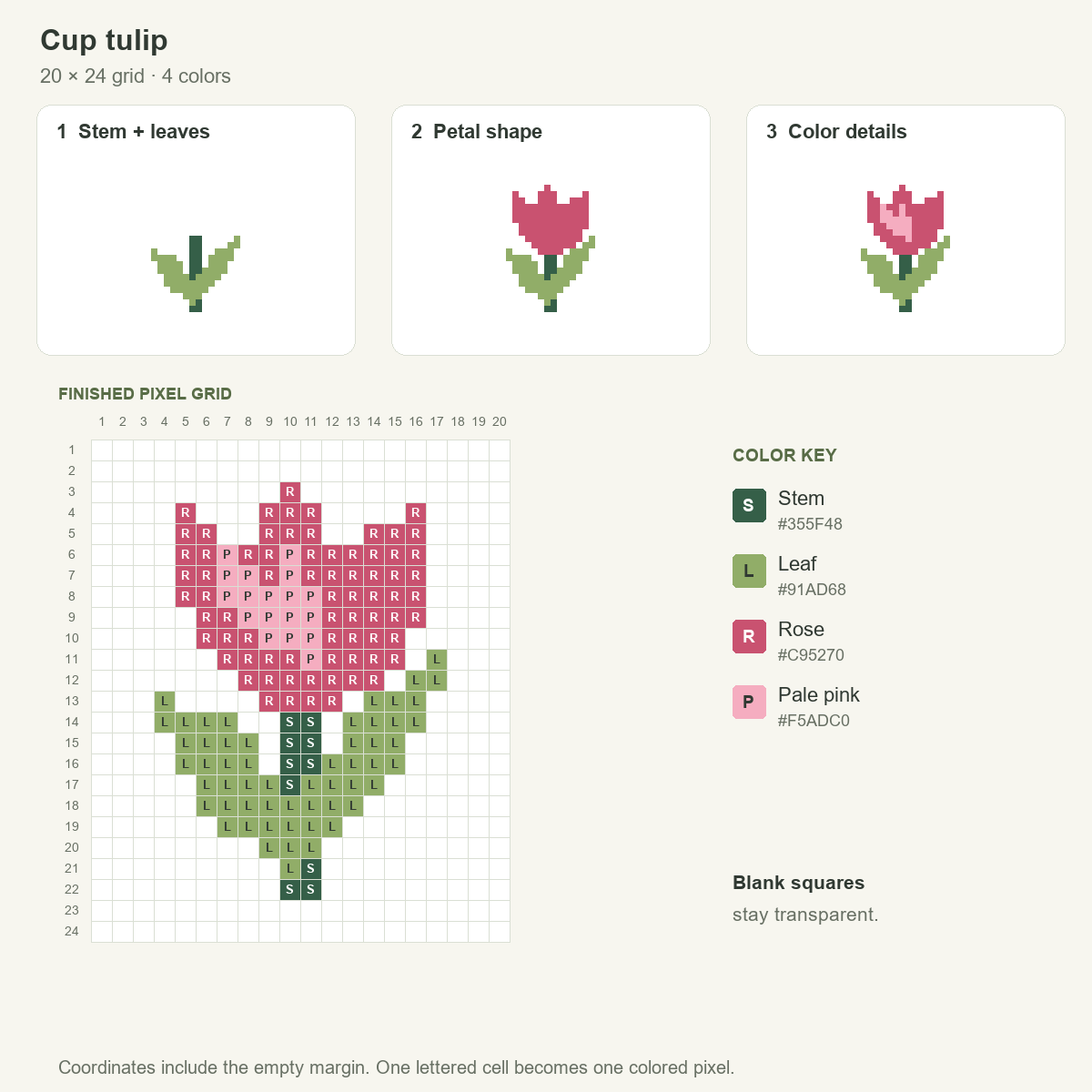
Reserve columns 10–11 for the straight stem. Attach one leaf low on the left and a taller leaf on the right. The different leaf heights keep this little plant from becoming a perfectly mirrored symbol.
Next, form the rose-colored cup over the top of the stem. Its highest tip reaches row 3. Let the outline drop between the tips instead of drawing a flat rim. Finish with the pale-pink patch inside the cup; it separates an inner petal without adding another line around the entire flower.
Practice change: deepen one notch by removing a rose cell near the rim. Compare the new outline with the reference before changing anything else. If the cup splits into separate pieces, undo that removal and choose a shallower notch.
Bellflower pixel art with a curved stalk
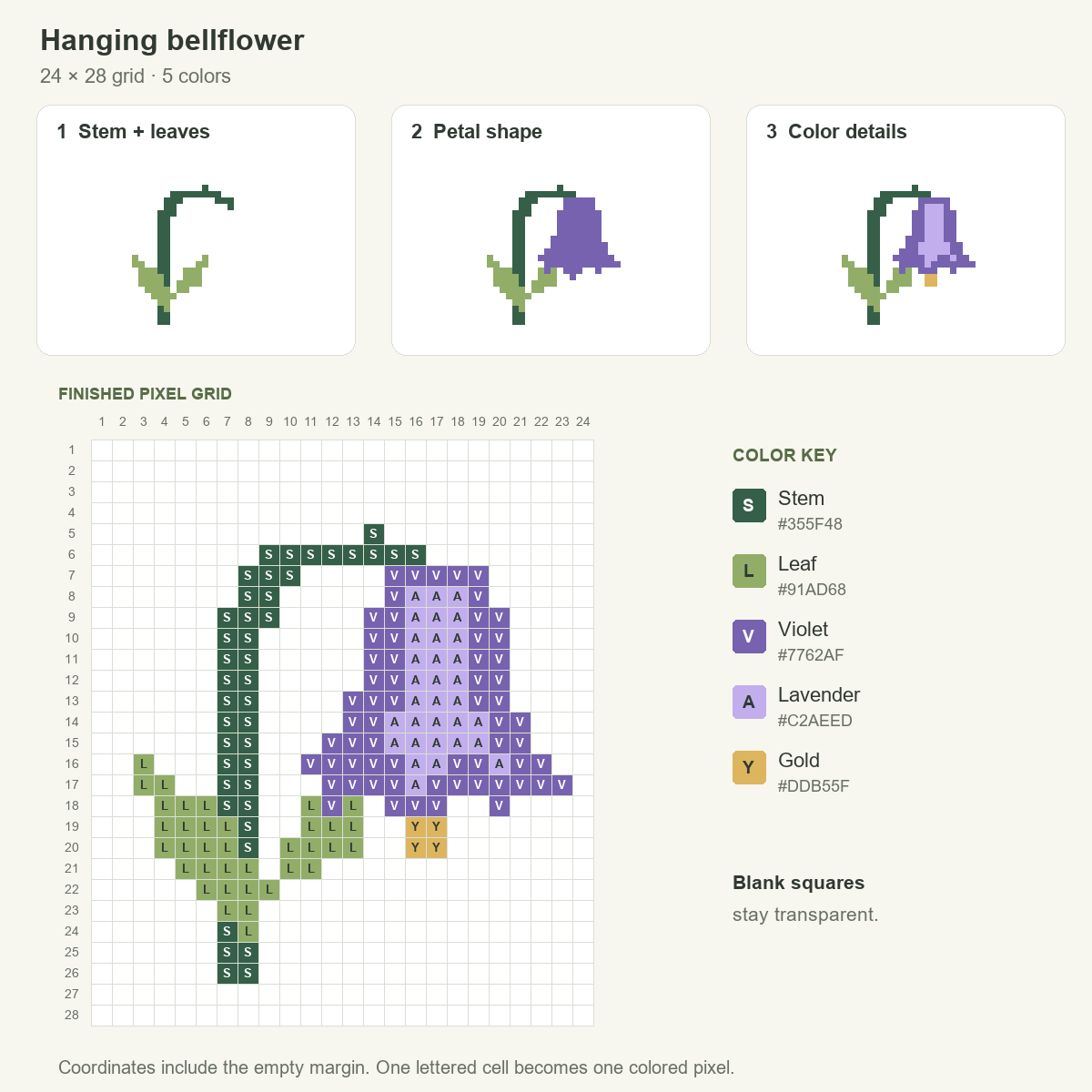
The upright stem rises on the left, then hooks over toward the bloom. Place that bend first so the violet head appears to hang from the plant. A stem drawn straight into its bottom edge would suggest an upward-facing flower instead.
Widen the bell as it descends. Keep the lower lip uneven, with small points around the opening, and add the lavender strip within the violet shape. The gold detail at columns 16–17, rows 19–20 hangs beneath the lip; it belongs to the flower, not to the green stalk.
Practice change: shift one leaf upward by two rows. Clear its old cells after moving it, then check that the new leaf still touches the stem. This changes the spacing without redrawing the bell.
A wide flower with separated petal tips
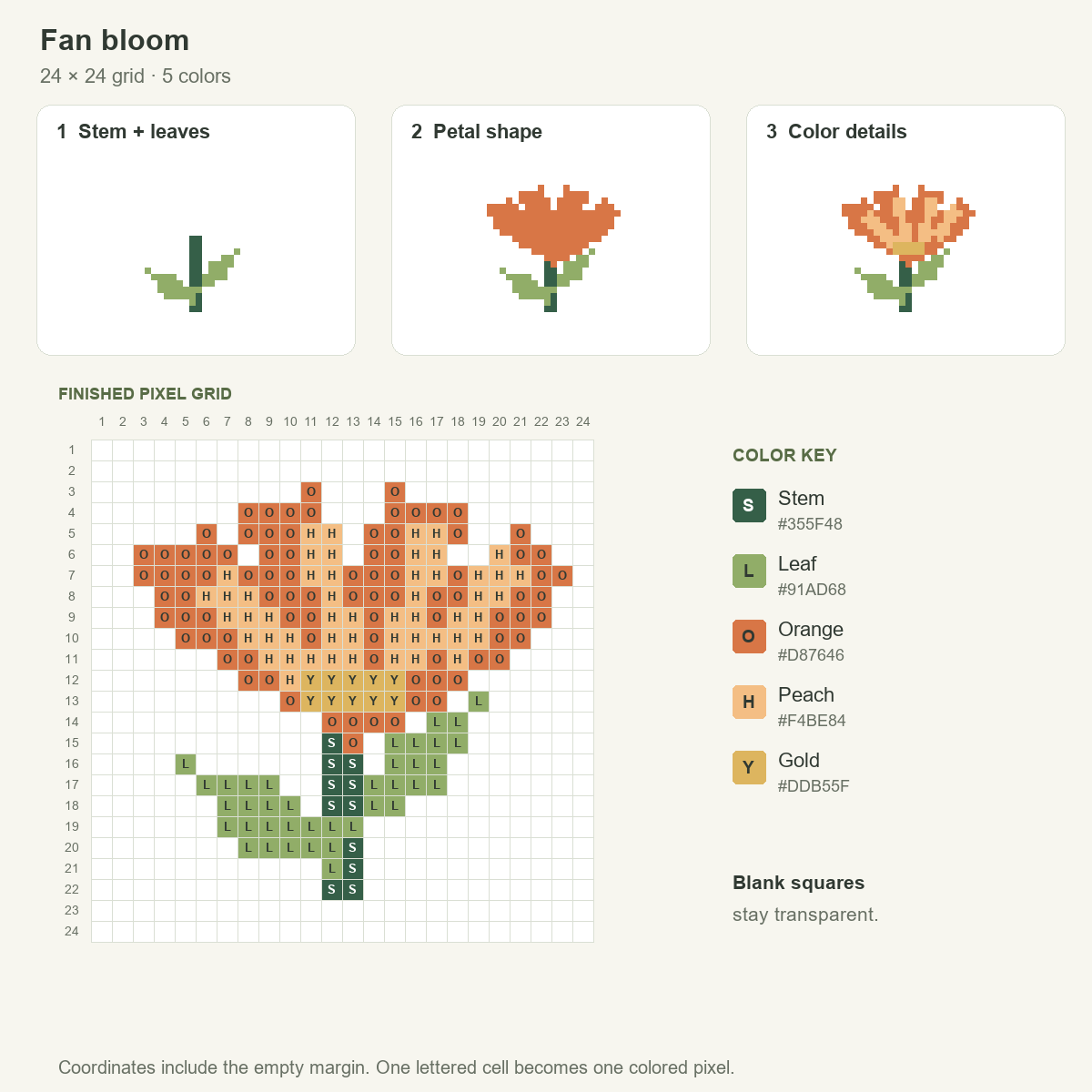
The fan bloom spreads across the upper part of a square canvas. Place the two leaves below that spread so they do not compete with the petals. When drawing the orange head, build the taller inner tips and lower outer tips around the same lower junction.
Add peach accents along the petals, followed by the gold base where they meet. The darkest-looking separations here come from empty space between tips, not from a black outline. Filling the notches would hide the fan even if every interior color stayed the same.
Practice change: extend the peach accent on just one petal. Leave the orange boundary fixed and judge how much of the petal can brighten before its shape becomes unclear.
Download Flower PNGs and Practice Sheets
Choose a transparent flower pixel art PNG below to obtain the finished drawing at its original size. The download contains the plant alone, without the surrounding chart, labels or paper-colored background.
- Cup tulip PNG — 20 × 24 pixels
- Hanging bellflower PNG — 24 × 28 pixels
- Fan bloom PNG — 24 × 24 pixels
- Flower drawing and practice sheets — seven-page PDF
The PDF pairs a completed reference with an empty grid for each flower: tulip on pages 2–3, bellflower on 4–5 and fan bloom on 6–7. Page 1 explains the set. Try the small change printed on each practice page after copying its reference. Color letters keep the charts usable in black-and-white prints.
For printing, use US Letter or fit the sheet within A4 margins. The numbered layout remains a drawing aid; its printed square size does not specify bead spacing, stitches or a finished craft measurement.
Using the flower files in a project
The three flower drawings may be adapted and included in personal or commercial work, including classroom materials, games, websites and printed products. You do not need to add a credit line. Finished projects containing the flowers may be shared; the unchanged downloads must not be redistributed or sold as a separate asset library.
Only this flower collection is covered. Site branding, unrelated images and article prose remain outside that permission, and use of a flower does not imply endorsement. Save the flower file permission note for the complete scope.
A flower photograph offers a different starting image if you want to study a bloom beyond this set. Send your own reference to the image to pixel art converter; its result depends on the supplied picture rather than the hand-planned stages shown here.